


Blackmagic Design DaVinci Resolve Advanced Panel
SKU: DV/RES/AADPNL

Key Features
- Control Surface for Resolve Controls
- T-Bar Panel and Transport Panel
- Slide-Out Keyboard, Reference Keys
- RGB Lift, Gamma, Gain Trackballs
- Node-Based Real-Time Image Processing
- 32-Bit Floating Point/YRGB Processing
- 5 x LCDs with Real-Time Key Information
- 30 x Soft Knobs, Illuminated Keys
- Jog/Shuttle Knob and Transport Controls
- Compatible with Mac, Linux, Windows
- 126,625.00 AED
- 126,625.00 AED
- Unit price
- per
Dimensions: 83 x 59 x 46 cm
Weight: 28 kg

Description
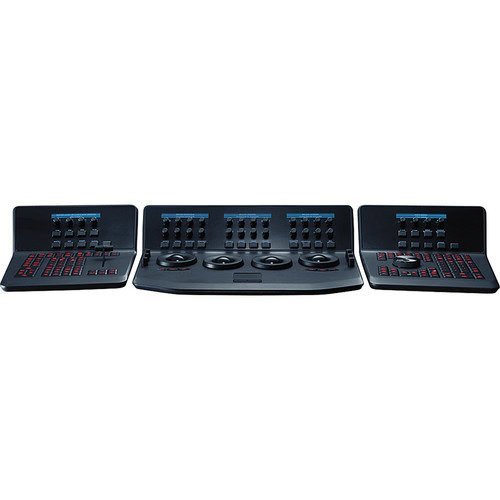
xThe Blackmagic Design DaVinci Resolve Advanced Panel is a professional color grading control surface designed for demanding DaVinci Resolve workflows. It combines a main center console with two auxiliary panels, giving colorists direct access to a wide range of color correction tools and parameters.
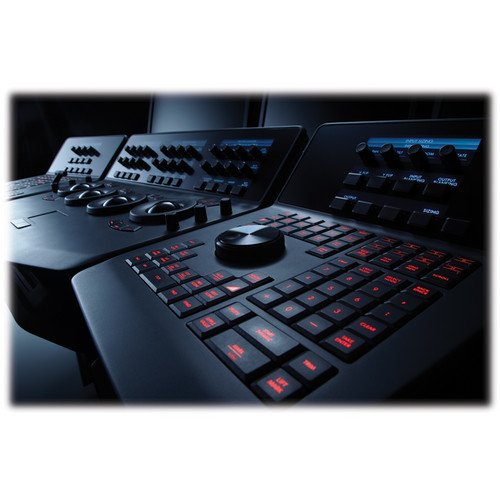
The center panel features four high-resolution weighted trackballs with surrounding control rings, while 30 customizable soft knobs provide precise parameter adjustments. Five high-resolution LCD displays show real-time information for the controls, while illuminated RGB keys provide quick access to commonly used functions.
A slide-out keyboard makes naming and renaming files easier, while the T-bar provides reference-still wipe control. The transport panel includes a jog/shuttle control and timeline controls, giving professional colorists hands-on access to grading and playback without relying on a mouse.
For professional video production and control equipment, explore the Systec Switchers & Controllers collection.
FAQs
What is the DaVinci Resolve Advanced Panel used for?
It provides extensive hands-on controls for professional color grading, image correction, timeline navigation, and reference-still comparison in DaVinci Resolve.
How many trackballs does the Advanced Panel have?
It has four high-resolution weighted trackballs. Three are used for lift, gamma, and gain adjustments, while the fourth can function as an offset or cursor control.
How many soft knobs does it include?
The panel includes 30 customizable soft control knobs with 4096 steps per rotation and push-button reset.
Does it include LCD displays?
Yes. It features five high-resolution LCD displays that show real-time information for the panel's controls.
Is the Advanced Panel designed for professional color grading?
Yes. Blackmagic Design describes it as a panel designed for direct access to DaVinci Resolve's color correction features and professional color grading workflows.
Specs
xSpecifications
| Product Type | Professional DaVinci Resolve color grading control surface |
|---|---|
| Panel Configuration | Center control panel with left and right auxiliary panels |
| Trackballs | 4 high-resolution weighted trackballs with surrounding control rings |
| Soft Knobs | 30 customizable control knobs |
| Knob Resolution | 4096 steps per rotation with push-button reset |
| LCD Displays | 5 high-resolution LCD screens with real-time control information |
| Keyboard | Integrated slide-out keyboard |
| T-Bar | Reference still wipe control |
| Transport Controls | Jog/shuttle control, timeline transport and function keys |
| Backlighting | RGB-backlit illuminated keys |
| Primary Grading Controls | Lift, Gamma, Gain, RGB and luminance controls |
| Log Grading Controls | Lowlights, Midtones and Highlights adjustments |
| Software | DaVinci Resolve |
| Supported Systems | Mac, Windows and Linux systems running compatible DaVinci Resolve software |
| Operating Temperature | 0°C to 40°C |
| Storage Temperature | -20°C to 60°C |
| Relative Humidity | 0% to 90%, non-condensing |
| Warranty | 1 Year Limited Manufacturer's Warranty |
